Configuring the Underlying Storage System in a Distributed Storage Environment
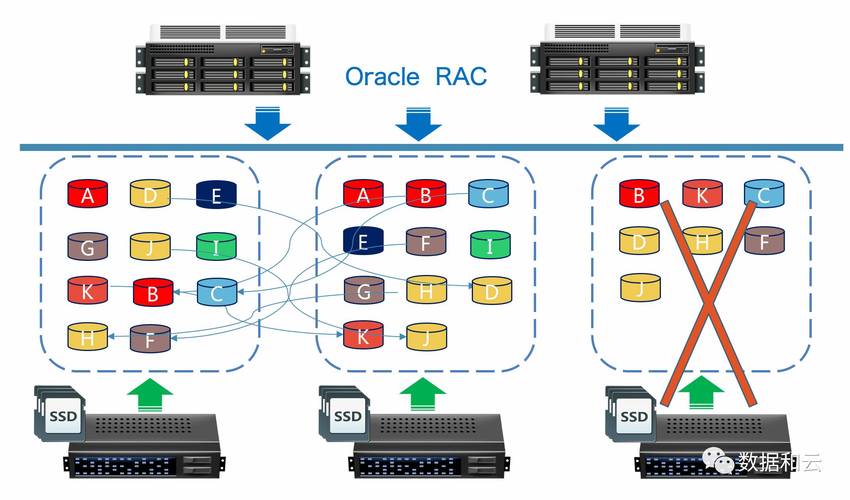
Distributed storage systems are designed to handle vast amounts of data across multiple nodes, providing high availability, fault tolerance, and scalability. When configuring the underlying storage system, several key factors must be considered to ensure optimal performance and reliability. This article will delve into the configuration of such a system, focusing on the hardware setup, network configuration, software deployment, and maintenance practices.
Hardware Setup
Node Configuration
Server Specifications: Choose servers with sufficient processing power, memory, and networking capabilities to meet the demands of the distributed storage workloads.
Disk Drives: Depending on the use case, select between HDDs for capacity or SSDs for speed. Consider using a mix for a balance between cost and performance.
Redundancy: Ensure that critical components like power supplies and network cards have redundant options to prevent single points of failure.
Storage Media
RAID Configurations: Employ RAID levels that provide both performance and resilience, such as RAID 10 for HDDs or RAID 5/6 for capacityintensive scenarios with some speed compromise.
Hot Spare Drives: Allocate hot spare drives in the array to automatically take over in case of disk failures without manual intervention.
Network Configuration
Connectivity
Switches: Use managed switches that support advanced features like VLAN, QoS, and link aggregation.
Network Topology: Design a resilient network topology with multiple paths to avoid bottlenecks and ensure connectivity in case of link failures.
Bandwidth
Speed: The network should be capable of handling the aggregate bandwidth requirements of all storage nodes.
Latency: Minimize latency by using highquality cabling and switches optimized for low latency.
Software Deployment
Distributed File System (DFS)
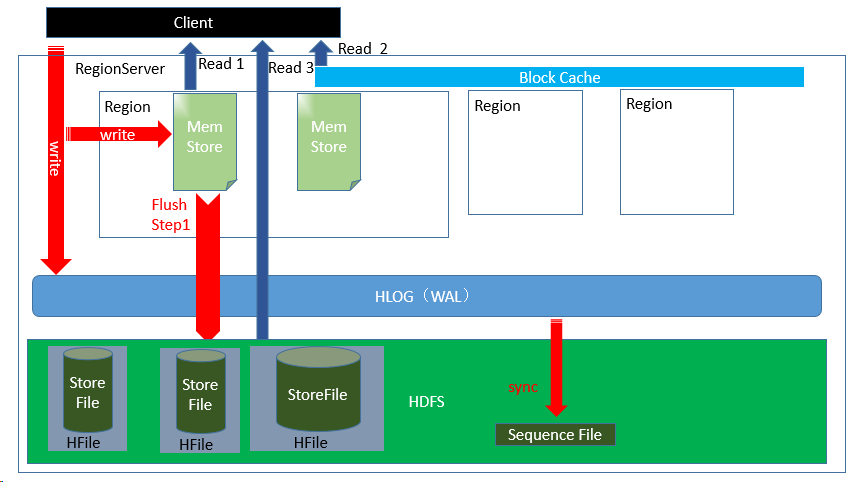
Choice of DFS: Select a DFS that matches the application needs, such as Hadoop HDFS for big data analytics or GlusterFS for flexible storage solutions.
Data Replication: Configure the appropriate level of replication for data durability, typically a factor of 3 for most distributed systems.
Data Management
Erasure Coding: For environments where storage efficiency is paramount, consider erasure coding instead of replication to save space while ensuring data integrity.
Metadata Management: Optimize metadata handling to improve performance, especially in largescale deployments where metadata can become a bottleneck.
Maintenance Practices
Monitoring
Tools: Implement monitoring tools to track the health and performance of the storage system continuously.
Alerts: Set up alerts for threshold breaches such as disk usage, temperature, or network latency to proactively address potential issues.
Updates and Patching
Regular Updates: Keep the system software uptodate with security patches and performance improvements.
Backup and Recovery: Ensure that there is a robust backup and recovery plan in place for disaster recovery scenarios.
Security Considerations
Access Control
Authentication and Authorization: Implement strong access controls to ensure that only authorized users and services can access the data.
Encryption: Use data encryption at rest and in transit to protect sensitive information from unauthorized access.
Example Configuration Table
| Component | Specification | Justification |
| Server | Dual Xeon processors, 128GB RAM, 10G Ethernet | High processing power for data manipulation; ample RAM for caching |
| Storage | 10TB SSDs in RAID 10 | Fast I/O for critical applications |
| Network Infrastructure | 10Gbps switches with LACP | Highspeed data transfer with redundancy |
| DFS | Hadoop HDFS with 3way replication | Faulttolerant storage for big data workloads |
| Security | AES256 encryption at rest, SSL/TLS in transit | Compliance with data protection standards |
Questions and Answers
Q1: How does one determine the right RAID level for their distributed storage system?
A1: The choice of RAID level depends on the specific needs of the system, such as the required balance between performance, redundancy, and storage capacity. For instance, RAID 10 offers high performance and redundancy but uses more disks, making it suitable for performancecritical applications. Conversely, RAID 5 offers capacity efficiency with reasonable performance and redundancy, making it suitable for capacityintensive applications.
Q2: What are the benefits of using erasure coding over traditional replication in a distributed storage environment?
A2: Erasure coding offers improved storage efficiency compared to replication by storing data fragments across a larger number of nodes, allowing for the same level of fault tolerance with less total storage used. Additionally, erasure coding can potentially reduce the read and write overhead associated with replication, leading to better overall performance in scenarios where storage space is at a premium or where I/O operations need to be optimized.
【版权声明】:本站内容若无意侵犯到您的权利,请及时与我们联系将尽快删除相关内容!